
A wallet address tells you very little about who you are dealing with.
Crypto transactions are often agreed first and checked afterwards. An address arrives in a message, a deposit is expected from a source nobody has looked at, and the checks that do exist are spread across a blockchain tool, an identity form and somebody’s inbox.
That leaves a business sending to, or accepting from, a party it cannot properly describe, with nothing on file to show what was checked, when, or what the result said.

Sending to a destination nobody screened
Crypto transfers are generally hard to reverse, so a destination wallet nobody checked is a risk you tend to learn about afterwards, when it is hardest to do anything about.

Accepting from a source nobody examined
Funds arrive from a wallet whose history no one looked at. The questions come later, from your own team, a banking partner or an auditor, once the transaction has already happened.

A wallet with no identified counterparty
An address does not name the person or business that controls it. Screening a wallet and identifying a counterparty are different checks, and doing only one leaves the other question open.

Results nobody can find
A screenshot in a chat thread is not a record. Without a dated result kept against the transaction, showing what was checked and when means reconstructing it from memory.
Screen the wallet on either side of the transfer.
Sending crypto: screen the destination wallet
Enter the destination address and its network, and Verify screens it for risk signals before you send. Your team gets a dated outcome to weigh in its own risk assessment while the transfer can still be held.
This is Wallet Screening Only: the wallet on its own, entered by your team, with no invitation to send and nothing for anyone else to complete.
A screening covers the address and network you entered. It cannot confirm that the transfer you make uses that address.
Accepting crypto: screen the source wallet
Enter the address the funds will come from and screen it before you accept them. The same screening applies whichever way the funds move; the question you are asking of the result is yours.
Where you also need to know who the sender is, a standalone screening is the first step, and the combined workflows below add the person or business behind the address.
A result describes the address. It does not identify the person or business that controls it.
What a screening reports
The result reports the overall risk level, the sanctions status and any risk flags or categories, direct or indirect and incoming or outgoing where the result provides that, with the date and time the screening ran.
The network, and any asset you choose to record, are kept with the result and printed on the report.
An asset you record is kept for reference. The screening covers the address on the network, not a particular token.
A dated result and a report you can keep
Every completed screening is dated. Download a Wallet Screening Report for it at no charge; each download is logged, and the report is produced from the stored result.
One wallet is one request. A transaction with two wallets is two screenings, each with its own result.
A report is a point-in-time result. It states that it is not an approval of any transfer.
Start screening wallets
Choose Wallet Screening in UMNIII Verify, enter the address and network, and get a dated result you can keep with the transaction.
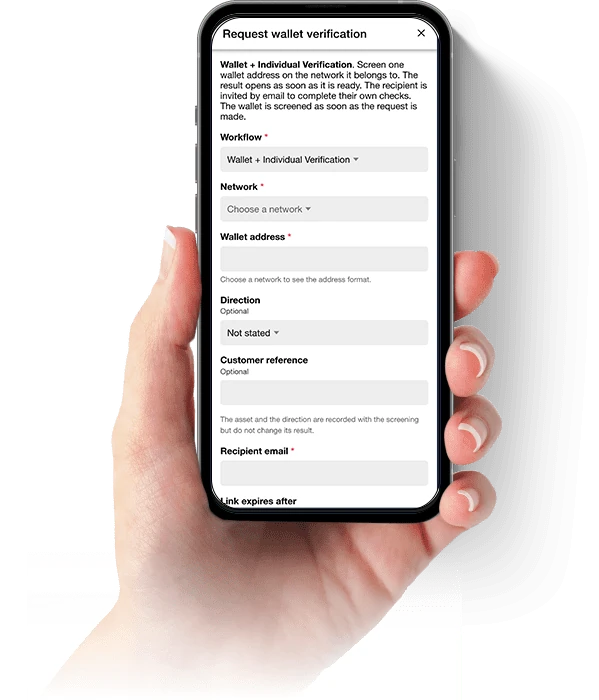
Screen the wallet and verify the counterparty in one request.
A wallet result describes an address. Identity verification and business verification describe the person or business you are dealing with. Verify runs them in one request, so each answers its own question and none is mistaken for another.
The wallet is screened the same way in every workflow. Combining checks adds checks; it never makes the wallet analysis deeper, and each check keeps its own result and its own price.

Wallet Screening Only
The wallet screened on its own, entered by your team. No invitation, no recipient and nothing for the other side to complete.
Wallet + Individual Verification
Wallet screening with identity verification and AML screening for the individual you are dealing with, plus any forms or documents your process requires.

Wallet + Business Verification
Wallet screening with business verification (KYB) for the company involved, and the related identity, ownership, AML, form or document checks your workflow includes.

Itemised, never bundled
The quote lists the wallet screening and every other check as separate lines, each at its own price, before anything is sent.
Verify the party on the other side of the transaction.
One party: the sender or the recipient
If you are accepting crypto, verify the sender and screen the source wallet. If you are sending crypto, verify the recipient and screen the destination wallet. Either way it is one request, and the identity result and the wallet result are kept together.
The party is told who is asking and what you will receive, and agrees before they start.
Each result stands on its own. A passed identity check does not improve a wallet result, and a wallet result does not stand in for an identity check.
Both parties and both wallets, before it proceeds
Verify both sides of a transaction as one case. Each party completes their own checks, each party’s wallet is screened, and you see every result against the same transaction.
Individual to individual, individual to business and business to business transactions are all covered. The checks follow the party: identity verification, with AML where you require it, for an individual, and business verification for a company.
Each party sees only what it is authorised to see, and never the other party’s documents or personal data.
The wallet you enter, or the wallet they supply privately
Your team can enter the address. Or you can ask the counterparty to provide it privately inside their own invitation, so it does not pass through email or chat and is not carried in links or notification emails.
You see the address they submitted in full, so you can compare it with the address you intend to use. The counterparty never sees the screening result.
An address a counterparty supplies is still only an address they gave you. Screening it does not prove they control it.
Private, not anonymous
Privacy here means that a party sees only what it is authorised to see. It does not mean the party is anonymous: UMNIII verifies who the person or business is, and keeps those results with the request.
You choose the workflow. The party completes it on their own phone from one link, in their own time.
Verifying a counterparty is separate from screening the wallet address they gave you, and the result of one never replaces the other.
Verify a digital-asset counterparty
Choose a one-party or two-party workflow, send each party one link, and keep every result, dated, against the same transaction.
From first request to evidence file.
Whichever workflow you choose, the sequence is the same: you compose the request, the checks run, and every result is kept against it.
The quote shows what will be charged, line by line, before you send.
Choose the workflow
Wallet Screening Only, Wallet + Individual, Wallet + Business, or a one-party or two-party counterparty workflow. Add forms or documents where your process needs them.
Enter the wallet, or ask for it
Enter the address and network yourself, or ask the counterparty to supply it privately as part of their own invitation.

Each check runs and reports separately
The wallet is screened. Identity, AML or business checks run as the counterparty completes them. Each one returns its own dated outcome.

Download the result and the evidence
Download the wallet screening report, each check’s own report and the evidence pack for the request, all dated and kept with the transaction.
What each outcome means, and what it does not.
Passed
The wallet met the Wallet Screening policy on the day it was screened. Where nothing adverse was reported, the result reads exactly “No adverse findings reported by the provider, as of <date>.”
Passed does not mean the wallet is safe, clean, legitimate or free of risk, and it is not an approval of any transfer.
Caution
A completed result: the screening reported risk signals that call for your attention. It is not a check waiting for someone to review it, and what it means for the transaction is your team’s decision.
After a Caution on a standalone screening, a common next step is to verify the person or business that controls the wallet. Where those checks have already passed, the result says so and points you to the transaction context, source-of-funds information, another wallet or your own risk policy instead.
Caution is a result for your risk assessment. It is not a recommendation to stop or to proceed.
Not passed
The wallet does not meet the Wallet Screening policy. The result is complete, dated and downloadable like any other.
It does not automatically mean the person behind the wallet is criminal, sanctioned or fraudulent, and Verify does not say so unless the result specifically supports that narrower statement.
Unable to complete
A check could not be completed, for example because of a technical failure. Retrying it is free, and a screening the service definitively cannot perform is refunded to your balance.
Unable to complete says nothing about the wallet. It means no result was produced.
Every result carries its date
A result is as of the date and time it was produced. The same address can read differently on another day, so a dated result is a snapshot of that day, not a permanent status.
Screening the same address again is a new screening, with its own result and its own date.
Verify does not monitor a wallet after it has been screened and does not screen transaction hashes.
In a combined workflow, the overall outcome is separate
Each check keeps its own result. The workflow also has an overall outcome. It reads Pending only while a check can still run, complete or be retried. Otherwise it reads Attention if any check failed, including a wallet that is Not passed or a declined identity or business check; Unable to complete if any check could not be completed; Caution if the wallet reads Caution; and Passed when every check passed.
A wallet that is Not passed never makes a passed identity, business or AML check look failed, and the overall outcome never replaces the result of the check beneath it.
One price for wallet screening. Every other check at its own.
Wallet Screening costs 0.5 credit per wallet screened. There is one Wallet Screening product: the network, the asset you record and the direction of the transfer do not change the price.
Credits belong to your Workspace and are used across Verify. The quote shows every fixed-price line and any business-verification hold before you send. Fixed-price checks are charged as shown; business verification settles from the hold according to the checks that complete.
0.5 credit per wallet
One wallet screened, one result, one report. Several wallets are several screenings.
1 credit, two wallets
A two-party workflow screens two wallets, so it contains 1 credit of wallet screening before any identity, AML, business, form or document charges.
Combined workflows are itemised
Wallet screening plus each other check at that check’s own price. Business verification is the exception to a fixed line: a hold is placed when you send and the final charge follows the checks that complete.
Not charged for what did not run
A request refused before it starts costs nothing, retrying a screening that could not complete is free, and one the service definitively cannot perform is refunded. A completed screening is not refundable.
Know the wallet, know the party, keep the proof.
An answer on file before the transfer
Before you send or accept, your team has a dated result for the wallet: an overall risk level, the sanctions status and any risk flags, with a report to download. The question “did anyone check this address?” has an answer, and the date it was given.
Screen first, then decide, with the result in front of you.
The person and the wallet, side by side
Add identity or business verification to the screening and the checks run in one request. Your team sees who is on the other side and what the wallet reports together, instead of stitching a blockchain tool, an identity form and an inbox into one picture.
One request, one record, and every result shown on its own.
Both sides of the trade, handled as one case
Verify one party or both, and screen the wallet on each side, as a single case. Individual to individual, individual to business and business to business all follow the same route, so you are not left with one side checked and the other assumed.
Both parties and both wallets, on the same transaction.
Wallet addresses that never travel by chat
Ask the counterparty to enter the wallet address inside their own invitation instead of pasting it into a message. You see exactly what they submitted, in full, so you can compare it with the address you plan to use.
No more copying addresses out of message threads.
Evidence you can hand over
Every result is dated, and every wallet screening report downloads at no charge. For a request with several checks, one branded evidence pack carries the request history, the results and the available evidence.
When someone asks what you checked and when, the answer is one download.
Your team makes the call, with the facts
Verify supplies the results and the evidence. Your team weighs them against its own risk policy and decides whether to proceed, with the facts on file rather than a recollection of what somebody checked.
Results and evidence for your own risk assessment.
Built for businesses that move or accept digital assets.
From a crypto broker screening a withdrawal address to a family office checking who is on the other side of a purchase, the question is the same: what do we know about this wallet and this party before we proceed?
Verify supplies the results and the evidence. Your team decides what to do with them.
VASPs
Screen deposit sources and withdrawal destinations, and verify the individual or business on the other side of a transfer.
OTC desks and brokers
Verify one customer or both sides of a trade, and keep each wallet result with the deal it belongs to.
Custodians
Screen the wallets funds will move to or from, with a dated result on file for each.
Crypto-funded real estate
Check the source wallet and the buyer before a property purchase funded in crypto proceeds.
Compliance and corporate-service firms
Run one structured request for clients who transact in digital assets, and keep the evidence in a single record.
Family offices
Check the wallet and the counterparty involved before a purchase or transfer, and keep a record of what was checked.
Escrow providers
Verify both parties and screen both wallets before a transaction is set up.
High-value asset dealers
Verify the buyer and screen the wallet before accepting digital-asset payment for a high-value sale.
Where this sits
UMNIII Verify
The platform this runs on: identity, company verification, forms, documents, Workspaces and evidence packs.
KYB and company verification
Registry information where it is available, supporting corporate documents, and the officers and owners the records provide.
AML and adverse-media screening
Sanctions and PEP screening, adverse media on the enhanced option, and twelve-month monitoring.
Workflow guides
How to build and save verification workflows by industry, with the forms, documents and checks each one uses.
Wallet screening and digital-asset verification FAQs
Wallet screening checks a crypto wallet address, on the network you specify, for risk signals and returns a dated result. UMNIII Verify reports the overall risk level, the sanctions status and any risk flags or categories the result provides, so your team has evidence to weigh in its own risk assessment before it sends crypto to the wallet or accepts crypto from it.
No. Wallet screening assesses risk signals for an address. It does not prove wallet ownership, it does not identify who controls the address and it is not blockchain identity verification. To establish who a person or business is, use identity verification or business verification, which Verify can run in the same request.
They answer different questions. Wallet screening looks at the address. KYC verifies an individual and KYB verifies a business, but neither assesses a wallet’s history. A combined workflow runs them together, and each check keeps its own result so that one is never mistaken for another.
Verify does not describe any wallet as safe, clean, legitimate or approved. Passed means the wallet met the Wallet Screening policy on the date it was screened. Where nothing adverse was reported, the result reads “No adverse findings reported by the provider, as of <date>.” It is a dated result for your own risk assessment: not an approval of any transfer, and not a permanent status.
Caution is a completed result, not a check waiting for someone to review it. It means the screening reported risk signals that call for your attention, and what that means for the transaction is your team’s decision. After a Caution on a standalone screening, a common next step is to verify the person or business that controls the wallet. Where those checks have already passed, the result says so and points you to the transaction context, source-of-funds information, another wallet or your own risk policy instead of suggesting the same checks again.
Not passed means the wallet does not meet the Wallet Screening policy. It does not automatically mean the person behind the wallet is criminal, sanctioned or fraudulent, and Verify does not say so unless the result specifically supports that narrower statement. What to do next is your decision.
Yes. Screen the destination wallet before you send, or the source wallet before you accept. The same screening applies in both cases, and what the result means for your transaction is for your own risk assessment. A screening covers the address on the network you entered. It cannot confirm that the transfer you make uses that address.
In a counterparty verification workflow, yes. You can ask the party to provide the wallet address privately in their own invitation rather than through email or chat, and the address is not carried in links or notification emails. You see the address they submitted in full, so you can compare it with the address you intend to use. The counterparty never sees the screening result. An address a counterparty supplies is still only an address they gave you: screening it does not prove they control it.
One-party verification checks one side of a transaction: the sender when you are accepting crypto, or the recipient when you are sending, together with that party’s wallet. Two-party verification checks both parties and both wallets as a single case, for individual to individual, individual to business or business to business transactions. Each party completes its own checks and sees only what it is authorised to see, never the other party’s documents or personal data.
Wallet Screening costs 0.5 credit per wallet screened, so a two-wallet workflow contains 1 credit of wallet screening. In a combined workflow every other check is added at its own price, and the quote in UMNIII Verify lists each line separately before you send. Business verification is the exception to a fixed line: a hold is placed when you send and the final charge follows the checks that complete. Credits belong to your Workspace.
Verify screens the address on the network you choose, and the product shows the networks currently offered when you compose a request. An invalid address or an unsupported network is refused before anything is charged. If you record an asset, such as a particular token, it is kept with the result for reference but does not narrow or change the screening.
Every completed screening carries the date and time it ran. You can download a Wallet Screening Report for it at no charge, and each download is logged. For a request with several checks, each check has its own report and the request has one evidence pack. Reports are point-in-time results, and each states that it is not an approval of any transfer.
Sign in to UMNIII Verify, choose Wallet Screening or a combined workflow when you compose a request, enter the wallet or ask the counterparty to supply it, and review the quote before you send.
Ready to screen a wallet or verify a counterparty?
Sign in to UMNIII Verify, choose the workflow and send your first request when you are ready.
Start verifyingA wallet screening reports risk signals for an address on the day it ran. It does not prove wallet ownership or identify who controls a wallet, it does not monitor a wallet or screen transaction hashes, it is not a Travel Rule solution, and no result is an approval of any transfer. UMNIII Verify supports your business’s risk assessment and evidences it: it does not make your transaction or client-acceptance decisions, and nothing on this page is legal advice about your obligations. See UMNIII Verify for the full platform.