
Pilot offer Get 10% off Verify credit packages with code PILOT10.
Start verifyingWhat a company check covers.
Business verification looks the company up against registry information where it is available, returns the company details the records hold, and gives the officers, shareholders and beneficial owners those records provide. The configured workflow may also require supporting corporate documents.
Forms and document requests you add yourself sit alongside that result, and any identity or AML checks you select run against the same request, so the company and the people behind it belong to one record rather than two unrelated files.

Registry lookup
Verify looks the company up against registry information where it is available. What comes back can include the legal name, registration number, company type, status, incorporation date, registered address and tax number. Coverage varies by jurisdiction, so confirm the ones you need before you buy.

Supporting corporate documents
The configured company-verification workflow may require supporting corporate documents, and where the check supports it their details can be extracted and compared with the registry information. What is required varies by jurisdiction, by company and by the workflow in use.

Officers, shareholders and owners
Officers, shareholders and beneficial owners are returned where the jurisdiction and the available records provide them. Where key-person details are missing, the workflow can ask the company to supply or confirm them, so the people behind a business are visible from the same request.

One record, one evidence pack
The company-verification result, anything you collected alongside it and any checks you selected for named people belong to one request. One branded evidence pack covers the request, with the supporting compliance document and the individual reports available separately.
A company is never only a company
Verifying a business usually means verifying people at the same time: the director signing the contract, the shareholder behind the holding company, the beneficial owner a risk policy says must be screened. Run as separate exercises, the company sits in one place and the people in another, and the connection between them lives in somebody’s memory.
In UMNIII Verify the company-verification result and any checks you select for individuals belong to the same request. The registry information, anything the company supplied and the identity or AML checks you chose are one case with one history, so the relationship between the business and its people is part of the record rather than something to reconstruct later.
Which individuals need checking, and to what depth, is your firm’s policy decision. Verify carries out what you ask for and records it; it does not set your threshold.
The awkward items are still collectable
Every jurisdiction has company facts that an API cannot return: a licence in a particular format, a board resolution, an ownership chart for a structure that does not fit a standard field, a letter confirming a trading address. These are often what hold onboarding up, because they arrive by email and then have to be filed somewhere sensible.
Custom forms and document requests handle exactly this, and they are separate from the company-verification workflow. You add them yourself when composing the request, you define the questions and the files, and the answers sit alongside the company-verification result rather than in a mailbox.
Collecting and evidencing an item is not the same as validating it. A document you add to a request is stored and evidenced, not automatically validated. Where Verify cannot check a company fact, it still provides the place to request it, retain the response and evidence the review. The assessment stays with your team.
Verify carries the work, your team keeps the judgement
Verify is where the work happens and where it stays. Registry information it can retrieve it retrieves. For a fact it cannot, you add a document request or a custom form to the same request, and the response is retained with the same case. A jurisdiction Verify cannot look up does not become a separate process in a mailbox.
Your team keeps every judgement that matters. Whether a company is acceptable, whether an ownership structure is satisfactory and whether to proceed are judgements for your business, and Verify carries out what you ask for, evidences it and leaves the decision with the people accountable for it.
UMNIII Verify does not file or submit anything to a government portal, bank, free zone or other destination system on your behalf, and UMNIII does not maintain registry data, so what Verify can return varies by jurisdiction; its only records check is UK residential address validation. It supports your compliance work and evidences it, and nothing it produces is legal advice about your obligations.
KYB and company verification FAQs
KYC establishes who an individual is. KYB establishes what a business is: that the company exists as a registered entity, what the records report it to do, and who those records give as its officers, shareholders and beneficial owners. In practice most onboarding needs both, because a business is represented by people, and UMNIII Verify can run them against the same request rather than as two exercises.
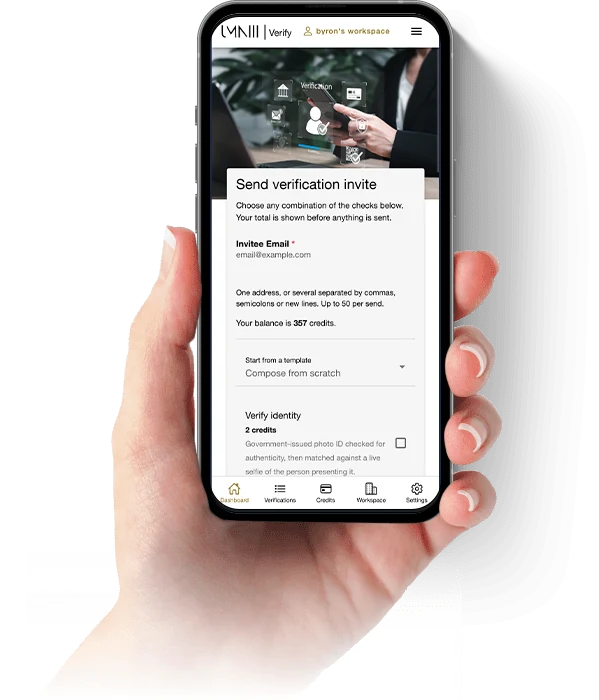
You select Business Verification as a check when you compose the request. Where they are enabled in the configured workflow, it searches for the company and looks it up against registry information, confirms the company information that is available, such as legal name, registration number, incorporation details, company status and registered address, and identifies the relevant directors, officers, shareholders and beneficial owners. It can include company screening and the screening or verification of required key people, and it can collect supporting company documents where the workflow requires them. Not every step applies to every company: what runs depends on the business, its jurisdiction and the workflow in use.
The check you select is Business Verification, and it can be selected on its own. Whether the check can be completed without linked verification then depends on the business and its jurisdiction: where the workflow requires it, verification is linked for particular directors, officers, shareholders or beneficial owners, and the Business Verification check cannot complete until those people and every other required step have been completed. Identity Verification and AML Screening for named individuals are separate checks you can select alongside it.
UMNIII Verify looks a company up against registry information, and what is available varies by jurisdiction: the company information a registry returns, and how much ownership and officer detail it holds, differ from one country to the next. Where a registry does not provide something, it can be supplied by the business or supported by documents within the Business Verification workflow. UMNIII does not maintain that data, so coverage is not a fixed list we can present as settled. If a specific jurisdiction matters to your business, tell us what you need and we will confirm what is supported.
Where the Business Verification workflow requires supporting company documents, it asks for those itself. Anything else, a licence in a particular format, a board resolution, an ownership chart, a letter confirming a trading address, is yours to ask for rather than something Verify requests on its own: when composing the request you add a document request or a custom form for it. Verify stores and evidences whatever is submitted with the request, but it does not automatically validate it. The assessment stays with your team.
Where it is configured, the Business Verification workflow can include company screening and the screening or verification of required key people. Separately, Identity Verification and AML Screening are checks in their own right, and either can be selected alongside Business Verification in the same Verify request. So it follows the workflow and what you select rather than a fixed rule either way. The AML and adverse-media page covers screening in detail.
Yes. Your logo, name and colours carry across the request the company receives, the emails Verify sends and the documents it generates. Workspace white-label branding is part of the White Label plan.
Verification runs on credits rather than a recurring commitment, so a business that verifies occasionally is not paying a monthly subscription to do it. Credits belong to the Workspace rather than an individual. Sign in to UMNIII Verify and verify your first company when you are ready.
Onboarding companies as well as people?
Use UMNIII Verify to collect company information, run the checks your workflow requires and keep the result with the request.
Start verifyingWhere this sits
UMNIII Verify
The platform these company checks run on: identity, AML, forms, documents, Workspaces and evidence packs.
AML and adverse-media screening
Sanctions, PEP and adverse-media screening for the officers and beneficial owners a company check returns.
UAE supplier verification
Supplier requests carrying the forms, documents and checks your team selects, under FTA Decision No. 13 of 2026.
Need a custom verification solution?
For businesses with more complex requirements, UMNIII Labs can build bespoke verification, onboarding and compliance software around your existing systems and processes.
Custom supplier portals, bespoke KYC and KYB systems, integrations with unrelated CRM, finance and line-of-business systems, complex approval chains, custom risk logic, multi-system workflows, bespoke dashboards and custom APIs.
If UMNIII Verify already covers what you need, that is the faster and less expensive route, and we will tell you so. Standard supplier-data integration, ERP sources included, is available through UMNIII Verify rather than a Labs build.
UMNIII Verify supports your firm’s compliance work and evidences it. It does not make your business compliant, it does not decide whether a company is acceptable, and nothing on this page is legal advice about your obligations. See UMNIII Verify for the full platform.