
Pilot offer Get 10% off Verify credit packages with code PILOT10.
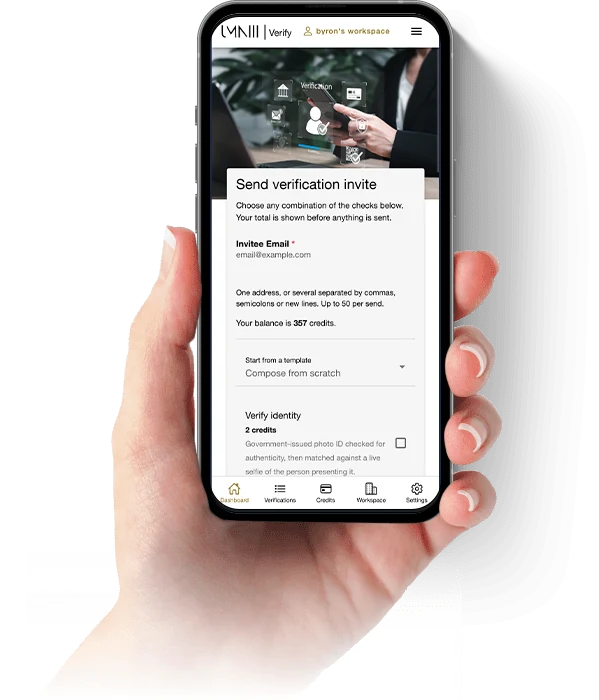
Start verifyingScattered checks are hard to run, and harder to evidence.
Onboarding often spreads across email, WhatsApp, forms and shared drives. Documents arrive in pieces, people are chased twice, and the record of what was checked becomes difficult to follow.
UMNIII Verify brings the request, checks, responses, documents and evidence into one structured workflow. Your team sees what is outstanding, acts on the results and keeps a clear record of the work.

Identity verification
A government-issued document checked for authenticity, matched against a live selfie, with liveness confirming a real person is present.

AML screening and monitoring
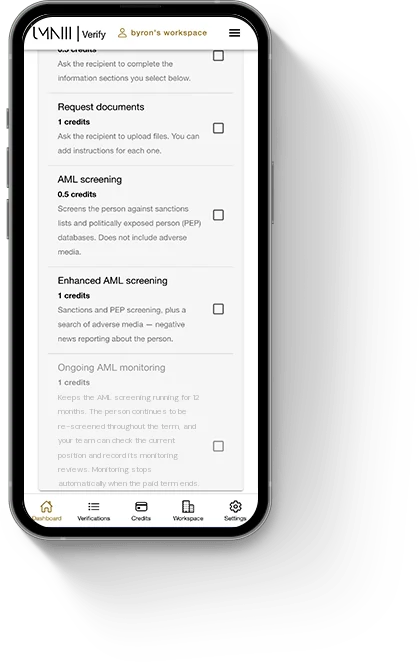
Sanctions and politically exposed person screening, with adverse-media checks on the enhanced option, plus twelve-month ongoing monitoring where the risk warrants it.

Business verification
A registry lookup where the information is available, the company details the records hold, and the officers and owners they provide, against the same case as the people you are checking.

UK residential records
Confirm a UK residential address against a records source, as part of the same request rather than in a separate tool.
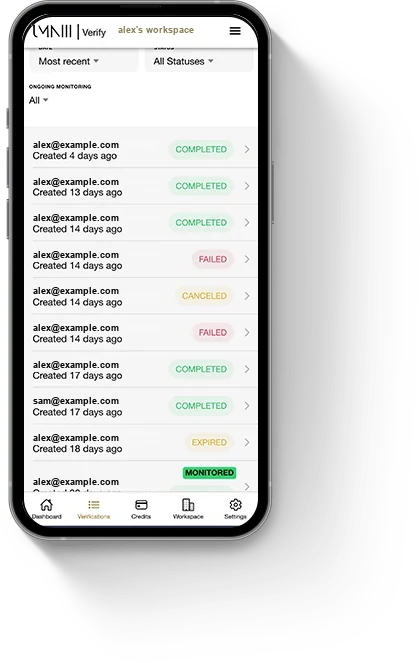
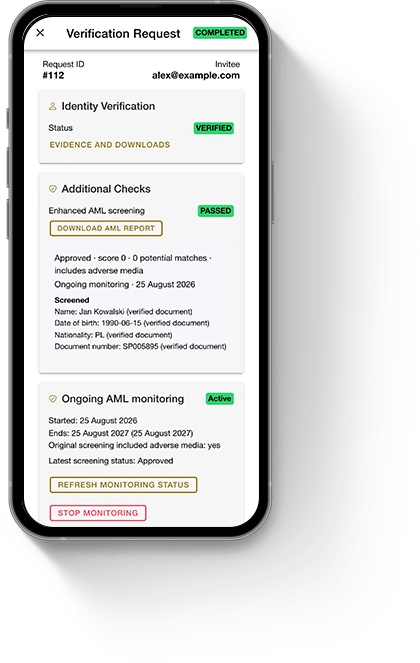
One document. The whole story.
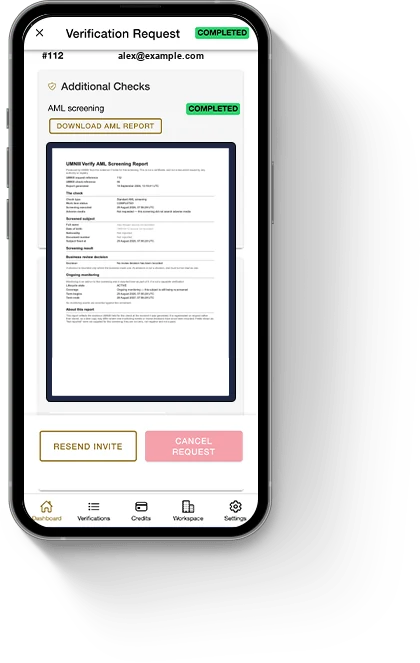
Each verification request keeps its checks, responses, uploaded documents and activity together. Download one branded evidence pack when you need to show what happened and what evidence was available.
Individual documents, form-response PDFs and AML reports remain available separately. Downloads stay within the Workspace and are recorded.
One evidence pack per request
One branded PDF carrying the request history, the results and the available evidence. Documents are included where they can be reproduced, and the pack clearly marks anything that cannot.
Ask exactly what you need
Ready-made question sets, your own custom forms, and forms published by the Verify community, plus document requests, all saved as reusable templates.
One client or many
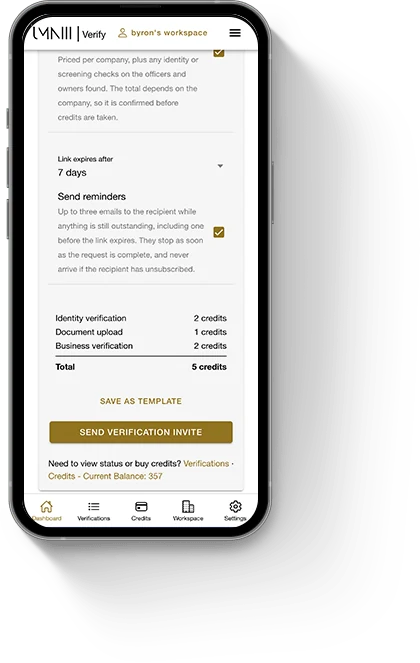
Compose a request once and send it to everyone who needs it, with the total priced before anything is sent and each recipient tracked as its own request.
Your team, your brand
Shared Workspaces with members, roles and shared credits, plus your logo, name and colours across the application, invitations, emails and generated documents.
Fits around the systems you already use
UMNIII Verify handles the work before and around submission: collecting what is needed, running checks, monitoring results and keeping the evidence. The completed case can then continue to the bank, free zone, government portal or other destination your process requires.
Verify does not submit to those systems or make your client-acceptance, match or reporting decisions. It gives your team the information and evidence needed to make those decisions.
How it is paid for
Verify is pay as you go. Buy credits and use them for the checks you need, with no per-seat charge or monthly minimum.
Credits belong to the Workspace, so the team draws from one shared balance. Workspace branding is included with the White Label plan.
Starting now? Use PILOT10 for 10% off credit packages. This is our introductory offer for the firms joining us first.
Enterprise supplier integration: available now
ERP IntegrationOne supplier integration layer, not a single SAP project.
Organisations with large supplier populations should not have to recreate every supplier by hand. UMNIII Verify is built around a standard Integration Source model: one way to bring supplier master data in, so that each new system is configuration rather than another bespoke build.
Supported sources include SAP, Oracle, other ERP and procurement systems, middleware, and structured supplier exports. Your team brings supplier data in, keeps it current, and chooses which suppliers to verify and when.
Your identifiers travel with the data
A supplier brought in through an Integration Source keeps the identifier it already has in your system, and each contact keeps a record of where its email address came from. You can tell which system a supplier and its contacts originated in rather than inferring it from a name.
Defined conflicts are raised for review
Defined conflicts are not resolved by guessing. If an imported primary email differs from the supplier’s selected email, if a source identifier is already assigned to another supplier, or if contact data cannot be matched deterministically, Verify records the issue for review. It does not silently replace the selected primary email or reassign the supplier identifier.
Synchronise first, verify when you choose
Supplier master data can be brought in and kept current as the working list your team draws from, and verification begins when somebody selects a supplier and starts it. Synchronising is not verification, so a supplier arriving in Verify is a record to work from and nothing more.
Your team decides what gets verified
Verification is started explicitly by your tax or compliance team, on the suppliers they choose, at the time they choose. An Integration Source populates the list they work from. It does not make that decision for them.
Verification remains under the explicit control of your tax or compliance team. Bringing supplier data into Verify does not itself submit anything to a tax authority or other destination system, start a verification, spend credits or email suppliers.
Set up an enterprise supplier integrationExplore a capability in depth
KYB and company verification
Registry information where it is available, supporting corporate documents, and the officers and owners the records provide.
AML and adverse-media screening
Sanctions and PEP screening, adverse media on the enhanced option, and twelve-month monitoring.
Wallet screening and digital assets
Screen a crypto wallet before you send or accept funds, or verify the individual or business involved in the transaction, with dated results and downloadable evidence.
UAE supplier verification
Supplier and supply verification under FTA Decision No. 13 of 2026, effective 1 October 2026.
Workflow guides
How to build and save verification workflows by industry, from supplier onboarding to vehicle rental.


Start verifying today
Sign in to UMNIII Verify, choose the checks you need and keep each request, response and evidence record together. Use PILOT10 for 10% off credit packages to start with.
Mobile apps coming soon


Verify FAQs
One structured way for a business to take someone on. You choose the documents, questions and checks you need, send a single branded link, and the person completes it on their phone. That person is often a client, but the same request suits a tenant, a director, a beneficial owner or anyone else you have to check. Identity verification, AML screening and business verification can run against the same request, and everything comes back to one record your team can search, reopen and download from.
Yes. Verify screens against sanctions, watchlist and politically exposed person data as part of the same request that collects your client’s documents, and the enhanced option adds adverse-media screening. You get the result and the supporting evidence available with it, time-stamped, and Verify records what your team does with it. Screening is a point-in-time search: it reports what was returned on the day it ran. A possible match is a record that resembles your client rather than a finding about them, so the review and the decision are your firm’s, and adverse-media screening is one input to enhanced due diligence rather than the whole of it.
Yes. Ongoing monitoring runs for twelve months. The person continues to be re-screened across the term, and your team can check their current position whenever you need it, alongside every monitoring-review decision you have already recorded. Monitoring stops automatically at the end of the term, and anyone in your Workspace with the right permission can ask for it to stop early. Monitoring is only shown as stopped once that has been confirmed.
Yes. Business verification can run alongside whichever individual checks you select: a registry lookup where the information is available, the company details the records hold, and the officers and owners they provide. The configured workflow may also require supporting corporate documents. All of it belongs to the same case, with the supporting compliance document available to download.
Yes. Compose the request once and send it to everyone who needs it. Addresses are checked and de-duplicated as you paste them, you see the total before anything is sent, and each recipient becomes a verification request you track individually, with the same columns, the same history and the same evidence as one composed on its own.
Yes. In a Workspace, you can import suppliers from a CSV file, match your spreadsheet columns to UMNIII Verify’s supplier fields and review the results before importing. Each file can contain up to 10,000 suppliers, and Verify records where imported supplier data came from so it remains traceable alongside configured system integrations.
One evidence pack for any verification request. It is one branded PDF containing its history, the available supporting evidence, the AML results, the submitted forms and the documents that can be reproduced. Where a document cannot be reproduced inside the pack, the pack marks that clearly rather than leaving a silent gap. You can also take the pieces separately: the uploaded documents, the form responses as a PDF, and the AML reports. Evidence packs belong to individual verification requests. Downloads are available to your Workspace only, and each one is recorded.
Yes. Work belongs to a Workspace rather than to an individual, so colleagues you invite see the same verification requests and the same history, with the role you give them. Credits belong to the Workspace too, so nobody is buying their own, and each Workspace’s data stays its own.
Yes. Your logo, name and colours carry across the application your team works in, the invitations your clients receive, the emails Verify sends and the documents it generates, so your client sees your firm rather than ours. Workspace white-label branding is part of the White Label plan.
Open the link and complete what you asked for, on their phone, in any order, over as many sittings as they need. They do not create an account, and they never see how your Workspace is set up.
You will see it. Every request shows how far it has got, so one that has stalled is visible rather than forgotten. Optional reminders follow up automatically while a request is still outstanding, you can nudge a particular person yourself, and you can resend a request that never arrived. You also choose how long a request stays open before it expires.
UMNIII Verify does. It is the workflow and the checks together: the request, your client’s journey, your branding, the record, the reports and the evidence pack, with the identity, registry and screening checks run through Verify itself, so you are not integrating anything or maintaining a compliance stack of your own. UMNIII does not maintain the underlying registry, sanctions, watchlist or news databases, and coverage varies by source and jurisdiction. Verify helps your firm stay on top of its compliance work; it does not decide whether to accept a client, and nothing it produces is legal advice about your obligations.
Sign in to UMNIII Verify, choose the checks you need and create your first request. Use the code PILOT10 for 10% off Verify credit packages.
We email you a secure sign-in link and a six-digit code together. Open the link, or enter the code on the Verify sign-in screen if you prefer. The code is also the way in when an email system alters links. Either method signs you in.
Documents and information are transmitted over encrypted connections and stored under access control, retrieved through short-lived links rather than left open. Your clients see only their own request; results, screening outcomes and your team’s recorded activity are never shown to the person being checked. What your own obligations require you to retain, for how long, and on what lawful basis remains yours to determine.
Businesses that take on clients regularly and check them by hand: corporate-service and company-formation providers, accountants, auditors, bookkeepers and tax firms, estate agents and property managers, and other regulated or compliance-conscious businesses. It is built for ongoing professional use, not one-off personal verification.
No. Verify is not designed for personal or self-verification, account recovery, or one-off identity checks. Access is provided to businesses managing client onboarding.
Ready to organise your client verification?
Sign in to UMNIII Verify, choose the checks you need and create your first request when you are ready.
Start verifying